3D Printing for Hobbyists: What You Actually Need to Start
3D printing became genuinely accessible in 2024-25. Here's how to start without buying $2,000 of equipment you won't use.
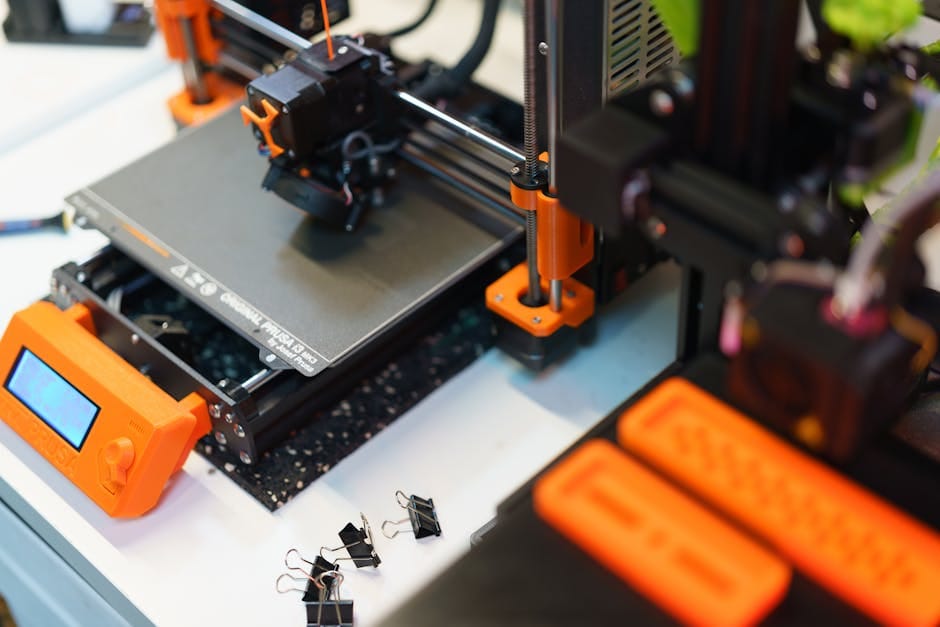
3D printing used to be a hobby for people who enjoyed tinkering with the hardware more than actually making things. You'd spend more hours calibrating the printer than printing with it. You'd read guides about bed leveling, extruder tuning, filament temperature ranges. You'd accept that one in five prints failed and called that "just how it is."
That era ended around 2023. Modern consumer 3D printers actually work. You unbox them, run a calibration routine that takes 20 minutes, and start printing things that look good. The hobby became approachable. If you've been curious but never started because of the reputation for fiddliness, that reputation is outdated.
Here's the practical starter guide. What to buy, what it actually costs, and what you'll realistically make with it.
The printer that changed things: Bambu Lab P1S
The Bambu Lab P1S at $799 is the printer I'd recommend to any beginner in 2026. Enclosed build chamber. Active cooling. Auto-leveling that works. Four-color printing via the AMS system (optional add-on at $349, but transformational). Print speed 3-5x faster than the previous generation of consumer printers.
The Bambu printers do something the previous generation didn't: they just work. Ten minutes from unboxing to first print. Software that handles slicing, print settings, and file transfer seamlessly. The hobby went from "learn the machine" to "use the machine."
The competitor entries worth knowing:
- Prusa MK4 ($999): Open-source, repairable, exceptional reliability, slower. For the hacker-maker crowd specifically.
- Creality K2 Plus ($1,299): Larger build volume, similar speed to Bambu. Ideal for bigger prints.
- Bambu A1 Mini ($299): Smaller, budget Bambu. Great for testing whether you'll use the hobby.
For most beginners, the P1S is the sweet spot. For people worried about commitment, the A1 Mini is a $299 way to find out without major investment.
What it actually costs over a year
Printer: $799 (P1S) or $1,148 (P1S + AMS)
Filament: $150-300/year for a hobbyist making 2-3 things a week. PLA is cheapest ($20/kg), PETG is slightly more ($25/kg). Specialty filaments (TPU flexible, carbon-fiber infused) are more expensive.
Accessories: $50 for basic tools — tweezers, scraper, calipers, lighter for bed debris, a small 5mm drill bit set.
Software: Bambu Studio is free. Fusion 360 hobbyist license is free. OnShape has a free tier. You don't need to pay for CAD.
Total first-year cost: about $1,000-1,300 for a committed hobbyist with the AMS system. $600-800 for a more casual user with the A1 Mini.
What you'll actually make
Practical household items
Brackets for cables under a desk. Organizers for drawers. Replacements for broken plastic parts on appliances (the clip that holds your vacuum hose, for example). Wall mounts for things you can't find a commercial mount for.
These practical prints are the 70% of my actual 3D printing output. Each one solves a specific problem that would otherwise require buying a $20-30 special-purpose item or just living with the problem.
Miniatures and toys
If you have kids, toys you design together are a meaningful parent-child project. If you're a miniature wargamer or hobbyist, the printer opens up a world of figures.
Parts for other hobbies
Camera gear mounts. Fishing tackle organizers. Custom tool holders. Bicycle accessories. Almost every hobby has something that 3D printing helps with.
What you won't make
You won't make a phone case that looks as good as an OtterBox. You won't make functional electronics enclosures that rival commercial products. You won't make parts that need to withstand heavy loads (with regular PLA).
3D printed parts look 3D printed. They have visible layer lines. They're not perfectly smooth surfaces. For everyday utility prints this is fine. For aesthetic showpieces or precision mechanical parts, there are limitations.
The learning curve
Week 1: Printing existing models from Printables or MakerWorld. No design skills required. Download, slice with default settings, print.
Month 1: Starting to modify designs in software. Scaling a model, changing colors, orienting differently for better print quality.
Month 3: Creating simple designs in Fusion 360 or OnShape. Basic parametric design.
Month 6: Comfortable designing moderate complexity parts. Understanding the principles of 3D printing (print orientation, support generation, layer heights).
Year 1: Able to design nearly anything within the limits of the technology. Confident in file preparation and troubleshooting.
Most users stop at the "download and print" stage, which is fine. The hobby delivers value even at the casual end of the curve.
Where 3D printing fails
Filament is a consumable
1kg of PLA costs $20-25 and lasts 30-50 medium-size prints. It's not expensive, but it runs out at inconvenient times. Keep backup filament. Different colors mean different spools.
Print failures still happen
About 5-10% of prints fail on modern Bambu printers — a significant improvement from the 20% failure rate of older printers. Common causes: bed adhesion issues on first layer, mid-print filament jamming, model with unsupported overhangs. Most failures are recoverable; some are total waste.
Noise
Even the quietest 3D printers are not silent. Running overnight prints in a bedroom is disruptive. A dedicated spot (garage, basement, spare room) is important.
The Bambu P1S runs about 50-55 dB — not loud, but not background white noise either. After a week of nightly prints next to my home office, I moved it to a different room.
Software choices
Slicer: what processes the 3D model for printing
Bambu Studio is the default for Bambu printers. Works well, free, actively developed. PrusaSlicer is the open-source alternative used for Prusa and many other printers.
CAD: what creates 3D models
Fusion 360 (free for hobbyists) is the pro-grade choice. Learning curve is real but the tool is capable. OnShape (free tier) is web-based and simpler to start with. Tinkercad (also web-based) is the easiest entry point for beginners.
Pick one and stick with it. Switching between CAD programs requires relearning their specific conventions. The tool you finish your first 20 designs in is the tool you'll likely continue with.
The community
Printables.com and MakerWorld are the two main repositories for free 3D models. Thousands of new designs weekly. Quality varies — filter by featured or popular prints.
Discord servers for specific printer models (Bambu Lab Discord, Prusa Discord) are excellent for troubleshooting.
YouTube channels worth watching: CNC Kitchen for technical depth, Thomas Sanladerer for broader coverage, Uncle Jessy for Bambu-specific tutorials.
What to skip
Skip resin printers (SLA/MSLA) as a first printer unless you specifically want high-detail miniatures. Resin printing has more complexity — handling liquid resin, post-processing with isopropyl alcohol, UV curing. It's not a bad technology, it's just a bad first technology.
Skip "budget" 3D printers under $200. The savings aren't real. You'll spend more time troubleshooting than printing. The Bambu A1 Mini at $299 is genuinely the floor for new buyers in 2026.
Skip specialty filaments as a beginner. PLA handles 90% of what you'll print. Master PLA first, then experiment with PETG, TPU, and others.
Skip printing your own phone accessories. They look worse than commercial versions. Save the printer for things you can't buy elsewhere.
The reality check
3D printing is a hobby that enhances your existing life in specific ways. It's not a business. It's not likely to pay for itself. It's not going to let you stop buying things from Amazon.
What it does is give you the ability to solve small physical problems that would otherwise require buying niche specialty items. And it gives you the satisfaction of designing and creating.
For the right person, this is worth $800-1,200 of initial investment. For the wrong person, the printer joins the treadmill in the garage. Be honest about which person you are. The easiest test: spend a weekend browsing Printables.com. If you find yourself genuinely excited about 20+ models you'd want to make, you're the right person. If you're scrolling past looking for one thing that grabs you, wait until a specific project motivates the purchase.
The technology has never been more approachable. The first year of ownership is more enjoyable than it's ever been. But the hobby still requires enthusiasm to stick. Make sure yours is real before buying.