The 2026 Robot Vacuum Buyer's Guide for Men: Why LiDAR Beats Guessing and When the Self-Emptying Dock Earns Its Price
LiDAR navigation, self-emptying docks, and AI obstacle avoidance compared, with a straight answer on whether the premium tier is worth $1,000 more than a mid-range robot vacuum.
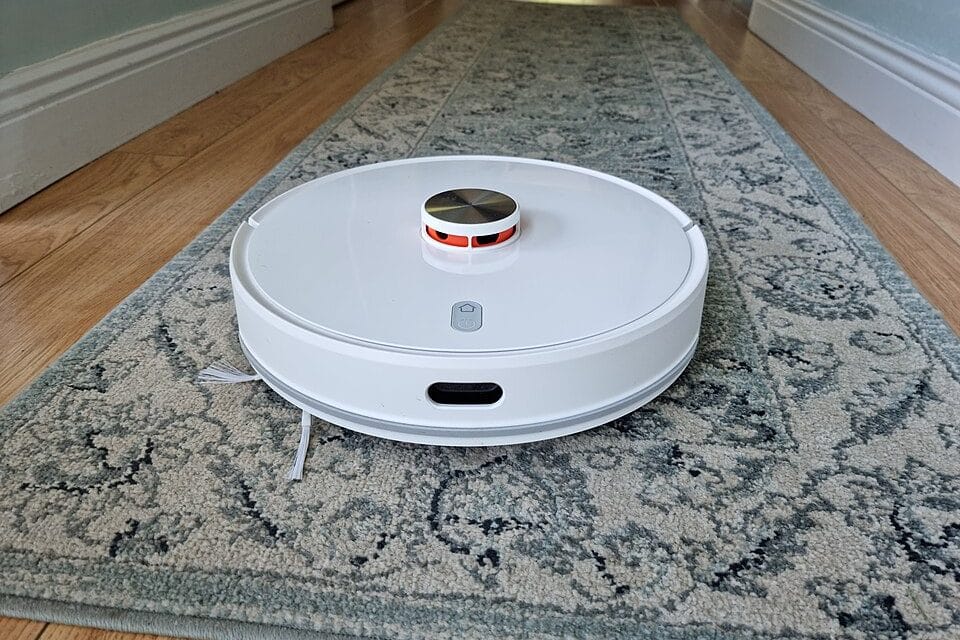
The cereal is ground into the living room rug again, the broom is buried behind the recycling bin in the garage, and you've got fifteen minutes before a call. This is the exact moment robot vacuums were built for, and in 2026 the gap between a $280 model that bumps around your living room like a confused hockey puck and a $1,600 one that actually maps your house has never been wider. The problem is that the marketing on the box barely tells you which side of that gap you're buying into.
LiDAR vs. camera-guessing: why navigation tech is the whole game
Every robot vacuum falls into one of two camps, and the difference shows up in the first ten minutes of ownership. LiDAR models — the ones with a small rotating turret on top, like the Roborock Qrevo Curv or the older S7 MaxV — spin a laser around the room, build a precise floor plan, and clean it in tidy rows. vSLAM models, which lean on a forward-facing camera and dead reckoning instead, guess their position from what the camera sees and how far the wheels have turned. Guessing works fine in a mostly empty studio. It falls apart in a house with a dining table, three rugs, and a dog bed that moves every other day. Most brands know which camp their cheaper models fall into, which is exactly why the navigation method rarely gets a clear mention on the product page — you usually have to dig into the specs tab or a teardown review to find out. Once you know to look for it, though, it takes about ten seconds to spot on any listing.
Budget robots almost always skip LiDAR to hit a price point under $350, and that's the single biggest tell when you're comparing spec sheets. A LiDAR robot finishes a 1,200-square-foot floor in a predictable, boustrophedon pattern — back and forth, no repeated passes, no missed corners. A camera-and-bump-sensor robot covers the same floor in loops that look almost random, and it will re-clean the open middle of your kitchen three times before it remembers there's a hallway on the left. Buy LiDAR. There's no scenario in a real house with furniture where the camera-only approach cleans faster or more thoroughly, and the price gap between the two has shrunk to about $80-120 as of this year.
Self-emptying docks: what you're actually paying for
A self-emptying dock isn't just a bin that sucks the dustbin clean after each run, though that's the part everyone talks about. On the mid-range and premium models — Roborock's Qrevo series, Ecovacs's Deebot X-series, Dreame's X-series — the dock also washes the mop pads in hot water, spins them dry with warm air so they don't grow mildew overnight, and refills the robot's clean-water tank automatically. That combination is what turns a robot vacuum into something you genuinely don't think about for three to four weeks at a stretch.
Here's the part nobody puts on the box: the dust bags for these docks aren't free forever, and that's a real ongoing cost worth budgeting for. A pack of three replacement bags runs $15-20 and lasts roughly two to three months in an average household with one shedding pet, so figure another $60-80 a year on top of the purchase price. It's a minor cost next to $1,500 hardware, but it's not nothing, and reviews that only quote the sticker price are quietly leaving it out.
Obstacle avoidance: the feature that actually changes daily life
Every premium robot now ships with some flavor of AI obstacle avoidance — Roborock calls its version ReactiveAI, Ecovacs calls it AIVI — using a small camera and, on the higher-end units, a structured-light sensor to identify and steer around cables, socks, shoes, and pet waste in real time. This is the one feature where paying more genuinely changes your daily life, not just the spec sheet. A $300 robot without it will drag a phone charger cable across your floor and jam itself under the couch trying to eat a sock. The $1,000-plus models with a real obstacle-avoidance camera stop, reroute, and keep going without a single support ticket to you.
- Budget tier ($250-400): bump sensors only, will eat cables and socks
- Mid tier ($500-800): basic camera detection, catches large obstacles, still misses thin cables sometimes
- Premium tier ($1,000-1,800): dual camera plus structured light, reliably identifies and routes around cables, pet waste, and shoes — and this is genuinely the tier where it stops being a chore to prep the floor before each run
It doesn't catch everything. A dark charging brick against a dark hardwood floor at dusk still trips up even the $1,600 models occasionally, and Roborock's own support forum has threads about exactly this from owners who otherwise love the machine.
The mopping question: hot water wash and lift-over-carpet
Combo vacuum-mop robots used to be a compromise you tolerated rather than a feature you wanted, mostly because early models either left carpets soggy or skipped mopping near rugs entirely. That's mostly solved now. The mechanism that matters is a retractable mop pad that lifts an inch or so off the floor the instant the robot's sensors detect carpet, so it vacuums the rug without dragging a wet pad across it. iRobot's Roomba Combo 10 Max and Roborock's Qrevo line both do this well; older combo units from three years ago mostly didn't, so if you're eyeing a discounted older model, check this spec specifically before buying.
Hot water washing at the dock — usually somewhere around 149°F — is what actually gets grime and pet hair out of the mop pad between runs, rather than just rinsing it with cold tap water and leaving a faint smell after a week. If you have hardwood or tile throughout and mop weekly anyway, this feature alone can justify skipping a manual mop session most weeks. If you're carpet wall-to-wall, skip the mop feature entirely and save the $200-300 premium it typically adds — you'd be paying for hardware that never touches your floors.
Multi-floor homes and whether mapping actually sticks
Every LiDAR robot in this price range claims to remember multiple floor maps, and in practice most of them genuinely do — carry the robot upstairs, set it down, and it recognizes the floor and pulls up the saved map within a minute or two. Where this breaks down is furniture that moves seasonally: a Christmas tree in the corner for six weeks, a rearranged living room after you finally got the new couch. The robot will treat the new object as an obstacle for the first run or two, then update the map itself. That's expected behavior, not a defect, and it's worth knowing before you assume the machine is broken.
Is the $1,500 tier worth it over a $600 mid-range model?
For most households, no.
A $500-700 mid-range LiDAR robot with basic camera obstacle avoidance and a wash-and-dry dock — think Roborock's Q-series or Ecovacs's mid-tier Deebot lineup — covers the actual daily need: a clean floor without you touching a broom for weeks at a time. The $1,000-1,800 tier earns its premium specifically in three household types: homes with a dog or cat that sheds heavily and needs the better obstacle-avoidance camera, homes with more than 1,800 square feet where faster mapping and longer runtime matter, and households mopping hardwood daily where the hot-water wash cycle gets used constantly rather than occasionally.
If none of those three apply to you, the extra $800-1,000 mostly buys a nicer app, a slightly quieter dock, and bragging rights. Spend it on the mid-tier model and put the difference toward something you'll notice more.
What to skip when you're comparing spec sheets
Ignore suction power ratings above roughly 6,000 Pa — every model in the mid-range and premium tiers now clears this bar comfortably, and the marketing arms race on this one number stopped correlating with real cleaning performance two years ago. Also skip anything advertising "AI room recognition" as a headline feature; it's now standard across every LiDAR model at every price point, so a brand leading with it as a differentiator is usually padding a weak spec sheet elsewhere.
- Suction above 6,000 Pa — diminishing returns, ignore the number
- "Smart room recognition" as a headline feature — standard everywhere now, not a differentiator
- Voice assistant integration if you don't already use Alexa or Google Home daily — nice on paper, unused in practice for most buyers
- App-based scheduling flexibility matters more than any of the above, and it's the one spec sheets barely mention
Check the app's scheduling options before you check anything else on the spec sheet. Some let you set different cleaning modes by room and by day — mop the kitchen daily, vacuum-only the bedroom on Tuesdays — and some force one blanket setting across the whole house. That difference shows up every single week you own the thing, long after the suction rating on the box has stopped mattering to anyone.